
What Are Glasses With A Camera In Them?
Glasses With A Camera In Them are no longer a science-fiction curiosity. They are wearable computers with lenses, microphones, speakers, and a small imaging sensor. Some models capture photos, record short videos, answer questions, or provide hands-free navigation. Others mainly support calls and audio. The camera is only one part of the product.
Market data shows why this category deserves careful attention. Counterpoint Research reported strong year-on-year growth in global smart-glasses shipments during 2024, driven largely by camera-equipped products such as Ray-Ban Meta. Its analysis also suggests that everyday design matters more than futuristic appearance. People tend to use glasses that feel familiar, light, and socially acceptable. That finding matches practical experience: a device can perform well in testing but remain untouched if it feels awkward on the face.
IDC’s Worldwide Quarterly AR/VR Headset Tracker places smart glasses within a broader extended-reality market. However, conventional smart glasses and display-based AR glasses are not identical. This distinction is often overlooked. A camera model may show no digital images at all. It may simply record a first-person view or connect to a phone. Privacy remains a serious consideration. Visible recording indicators, clear user controls, and responsible data handling should guide product evaluation. Laws and workplace policies also differ by region, so users must check local requirements.
The category is still developing. Battery life, image quality, privacy signals, and repairability need improvement. This guide explains how these glasses work, what they can realistically do, and where marketing claims deserve skepticism. A camera does not automatically make glasses intelligent.
What Are Glasses With a Camera in Them?
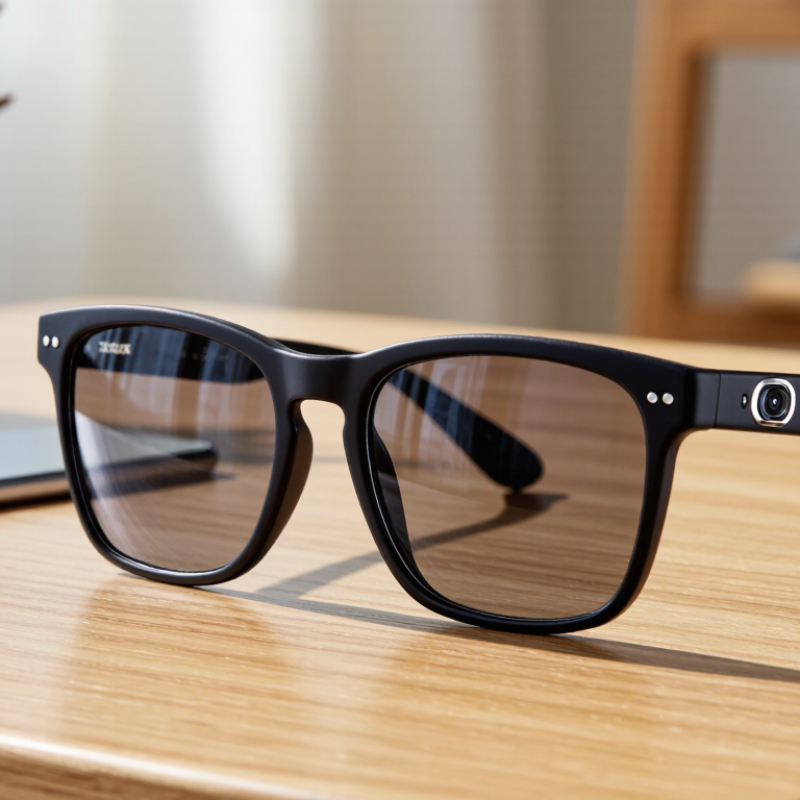
Glasses with a camera in them are wearable devices that combine vision correction or sun protection with a small imaging sensor. The camera usually sits near the frame hinge or bridge. It can capture photos, short videos, or hands-free audio notes. Some models use a phone connection for storage, processing, and sharing. A small indicator light may show when recording begins, but visibility can vary.
In practical use, these glasses can document a bike ride, a museum visit, or a repair task. They keep both hands available. I have found that camera position matters greatly. A slight head movement can change the framing. Bright outdoor scenes often look better than dim rooms. Battery life also depends on video quality, wireless activity, and weather.
They are not invisible recording tools. Responsible users should ask permission before filming people, especially in private spaces. Local privacy rules may differ, so checking them matters. Audio recording can create additional concerns. The glasses may feel natural after several hours, yet they can still look unusual to others. A camera cannot replace careful judgment. That part remains imperfect. Personally, I would treat them as a useful perspective-capture device, not a complete substitute for a phone or dedicated camera.
How Camera-Equipped Glasses Work
What Are Glasses With A Camera In Them?
Camera-equipped glasses combine a tiny image sensor, processor, battery, microphones, and wireless connectivity inside an ordinary-looking frame. The camera captures short video or still images through a lens near the wearer’s eye line. The processor then compresses each file before sending it to a connected device or cloud service. That delay matters. It can affect image sharpness, audio timing, and battery life.
A practical model uses several small systems working together. The camera needs enough light, while electronic image stabilization reduces movement caused by walking. Microphones filter wind and nearby voices. A visible recording light can signal when capture is active, although design choices differ. Responsible use also requires clear consent, strong account security, and careful control of stored footage.
Industry data suggests growing interest, but adoption is not automatic. Grand View Research estimated the global smart-glasses market at about 1.93 billion dollars in 2023, with strong growth expected through 2030. Meanwhile, IDC reported a 21.9% decline in broader AR/VR headset shipments during 2023. The contrast is useful: smaller, lighter devices may attract users, yet comfort and trust remain difficult engineering problems. Not magic. A camera can record a useful point-of-view clip, but poor lighting, limited battery capacity, and accidental activation still reduce reliability.
What Are Glasses With a Camera In Them?
Camera-equipped glasses combine a small image sensor, onboard processing, storage or wireless connectivity, and a battery inside a wearable frame. The chart compares the pixel dimensions commonly used for video capture and shows how image detail increases as resolution rises.
How they work: The camera captures individual frames, the processor converts and compresses the image into a video stream, and the glasses either store the footage locally or transmit it to another device. Higher resolutions contain more pixels per frame, which generally requires more processing power, storage capacity, and battery energy.
Pixel counts are calculated from standard 16:9 video resolutions: 1280×720, 1920×1080, and 3840×2160.
Main Features and Common Uses
What Are Glasses With a Camera In Them?
Glasses with a built-in camera combine ordinary eyewear with hands-free image capture. A tiny lens usually sits near the frame’s bridge or outer edge. Many models also include microphones, speakers, wireless connectivity, and simple control buttons. Some offer voice commands or a small indicator light during recording. The camera may capture photos, short videos, or live visual notes. Image quality depends on lighting, lens position, stabilization, and battery capacity. They are useful, but they are not magic.
Common uses include documenting repairs, recording outdoor activities, creating instructional material, and saving quick visual reminders. A technician might film a close-up inspection while keeping both hands available. A traveler could capture a street view without holding a phone.
However, footage can look awkward if the frame shifts during movement. Audio may also become unclear in wind or crowded places. I think users sometimes trust these glasses too much. They should support attention, not replace it.
Avoid recording in private areas, and follow local privacy and consent rules. Clear disclosure builds trust and prevents avoidable problems.
Privacy, Safety, and Legal Considerations
What Are Glasses With A Camera In Them?
Privacy, Safety, and Legal Considerations
Glasses with built-in cameras look like ordinary eyewear, but they can capture photos, video, and sound. Their small size makes recording feel effortless. That convenience creates serious privacy concerns. People nearby may not notice the camera. A visible recording light helps, but it cannot replace clear consent.
Consent matters. Ask before recording identifiable people, especially children, patients, workers, or guests in private spaces.
Laws vary between countries, states, and even workplaces. Some places require permission from everyone in a conversation. Other rules protect private areas, personal data, or biometric information. Recording someone in a changing room, medical setting, classroom, or home may create severe legal and ethical problems. Do not assume public space means unlimited permission. Check local privacy rules and organizational policies before using the glasses. A lawyer or official regulator can provide more reliable guidance than online comments.
Safety also deserves attention. Cameras can distract the wearer while walking, cycling, or driving. Reflections, low battery warnings, and poor visibility may increase accidents. Store recordings securely and delete unnecessary files. Avoid automatic cloud uploads when privacy is uncertain.
In practice, users may forget to explain the device clearly. I might underestimate that risk too. A short explanation, a visible signal, and a pause before recording can prevent confusion. The technology is convenient, but responsible use requires judgment every time.
How They Differ From Regular Smart Glasses
Glasses with a camera are wearable devices that capture photos or short videos from a user’s eye level. A small lens usually sits near the frame, while a button or voice command starts recording. This position creates a natural viewpoint, similar to seeing through someone’s eyes. Regular smart glasses may offer speakers, notifications, navigation, or tinted lenses without recording visual content.
The camera changes the experience. It can document a bicycle repair, capture a family moment, or support hands-free notes during field work. Audio prompts may guide the wearer, while built-in storage or a connected phone saves the files. However, camera glasses often need more battery power. Their frames may feel heavier near the temples. Bright sunlight can also reduce image quality, and quick movement may produce shaky footage.
Privacy requires careful attention. A visible recording light can help nearby people understand what is happening, but it is not a perfect safeguard. Ask for consent before recording private conversations or identifiable individuals. Check local rules because recording requirements differ by location. In practical use, these glasses are convenient, not invisible. They can miss important details. That matters. I also think many buyers overestimate their intelligence; a camera can see a scene, but it may misunderstand context, lighting, or facial expressions. Regular smart glasses usually feel less intrusive, while camera-equipped models offer stronger documentation and greater responsibility.
What Are Glasses With a Camera in Them? — How They Differ From Regular Smart Glasses
| Comparison Dimension | Glasses With a Camera | Regular Smart Glasses |
|---|---|---|
| Basic Definition | Eyewear with an integrated image sensor that can capture still photos or record video from the wearer’s viewpoint. | A broad category of connected eyewear that may provide audio, notifications, sensors, displays, or other digital functions. A camera is not required. |
| Primary Function | Hands-free visual capture, first-person recording, visual documentation, and sometimes live sharing. | Hands-free access to information, communication, audio playback, navigation assistance, activity sensing, or device control. |
| Camera Capability | Usually includes a front-facing camera, with image quality, field of view, stabilization, and recording limits varying by model. | May include a camera, but many designs rely only on microphones, speakers, motion sensors, touch controls, or a small display. |
| Typical User Interaction | Photo or video capture may be started with a physical button, touch control, voice command, or an accompanying mobile application. | Interaction commonly uses voice commands, touch gestures, buttons, head movement, a phone application, or visual controls. |
| Output and Feedback | Captured media is generally stored on internal memory or transferred to a paired device. Some models provide audio or visual confirmation during recording. | Feedback may include audio through open-ear speakers, notifications, visual overlays, indicator lights, or information shown on a connected device. |
| Display Requirement | A display is optional. Camera glasses can record without showing information in the wearer’s field of view. | A display is also optional. Some smart glasses provide a heads-up display, while others offer audio-only functions. |
| Privacy Considerations | Higher privacy sensitivity because people nearby may be recorded without realizing it. Visible recording indicators, consent practices, and local laws are important. | Privacy concerns depend on the sensors included. Microphones, location services, biometric sensors, and cameras can each create different risks. |
| Connectivity | Often connects to a smartphone through Bluetooth or Wi-Fi for media transfer, remote control, software updates, or cloud features. | May connect through Bluetooth, Wi-Fi, cellular connectivity, or a companion device, depending on the available functions. |
| Battery Demand | Recording video generally consumes more power than passive audio or basic sensor functions, so continuous recording can shorten operating time. | Battery life varies widely. Audio playback, active displays, wireless communication, cameras, and frequent sensor use usually increase power consumption. |
| Storage Requirements | Requires local storage, phone storage, cloud storage, or a combination of these to save photos and video files. | Storage needs are usually lower when the glasses only stream audio, display notifications, or relay sensor data. |
| Best-Suited Activities | Hands-free documentation, short-form personal recording, outdoor activities, demonstrations, inspections, and accessibility-related visual assistance. | Calls, music, navigation prompts, notifications, translation support, activity tracking, accessibility assistance, and hands-free device control. |
| Key Limitation | Video quality can be affected by movement, lighting, lens position, battery capacity, storage limits, and restrictions on recording in private or protected locations. | Functionality can be limited by battery life, phone dependence, network coverage, comfort, compatibility, limited display space, or the absence of a camera. |
Important: “Camera glasses” are a type of smart glasses, but not every pair of smart glasses has a camera. Features, recording duration, storage, battery performance, privacy indicators, and connectivity vary by product design and local regulations.